Strategy and Performance Management Software
BSC Designer
Move beyond Excel to align strategy, execution, and measurable results.
BSC Designer is strategy execution and performance management software for aligning goals, KPIs, initiatives, risks, and scorecards across teams and business units.

Estimate savings from moving from spreadsheet-based strategy tracking to structured strategy execution in BSC Designer.

Is BSC Designer the Right Fit?
BSC Designer is a good fit when spreadsheets or basic KPI tools no longer provide enough structure for managing performance across teams or business units.
BSC Designer Is a Good Fit When…
- Your spreadsheet-based KPI or performance process has become difficult to maintain as metrics, teams, and reporting requirements grow.
- You need to connect goals and KPIs across teams or business units.
- You need structured KPI management with targets, formulas, weights, ownership, and regular updates.
- You need controlled access and accountability with clear ownership, permissions, and audit history.
A Simpler Tool May Be Enough When…
- Your performance process is simple, with few KPIs and little need to coordinate across teams.
- You mainly need task or project tracking rather than strategy management.
- You only need to record KPI values and review progress periodically.
When Excel Becomes Hard to Maintain
As performance tracking grows, spreadsheets become harder to keep organized.
| In Spreadsheets | In BSC Designer |
|---|---|
| KPI data is spread across files, making it hard to see the full picture. | Connect team and business-unit scorecards in one structure. |
| Historical KPI data becomes harder to organize and analyze over time. | Update KPIs while the platform keeps the history organized. |
| Before each review, data has to be collected from different files. | Work with up-to-date scorecards and reports. |
| Updates can be missed when overdue data is difficult to track. | Assign owners, set update intervals, and flag overdue KPIs. |
| User access is managed by sharing files or copies. | Control who can view or edit specific scorecards and KPIs. |
| Formulas and progress calculations can break. | Define calculations once and apply them consistently. |
Keep the process that already works. Remove the spreadsheet work around it.
Reliable KPI Calculations Without Spreadsheet Errors
Automate KPI calculations, including normalization, weights, indexes, and progress, without maintaining complex spreadsheet formulas.
 Organize goals and KPIs into a structure.
 Manage weights, optimization functions, and grouping.
 Calculate scorecards automatically.
Connect Corporate, Business Unit, and Functional Scorecards
Organize strategy and performance management into connected scorecards for corporate, business-unit, and functional teams while keeping dependencies, KPIs, initiatives, and responsibilities aligned.
 Cascade the company’s strategy into strategic and functional scorecards.
 Establish a performance measurement system to quantify objectives, KPIs, and initiatives.
A practical walkthrough of the architecture behind successful strategy execution with BSC Designer.
 Download PDF
 Sign Up
Manage the Strategy and Performance Review Cycle
Connect goals, KPIs, initiatives, risks, owners, and evidence in one structured workflow—from setup and data updates to management review and follow-up decisions.

Structure
Structure goals, KPIs, and ownership
Connect goals with KPIs, initiatives, risks, owners, formulas, targets, and weights.
Create
Create strategy and functional scorecards, or import an existing strategy with goals, KPIs, targets, and initiatives.
Configure
Assign owners, set update intervals, define formulas and weights, and keep reporting consistent across scorecards.
Execution
Track progress, evidence, and results
Collect performance data, update initiatives, attach evidence, discuss changes and approve reported results.
Update
Enter KPI values manually or connect data sources. Add evidence for reviews and audits. Connect to project management tools.
Collaborate
Comment on KPI changes, clarify assumptions, approve data, and keep discussions linked to the relevant goal or initiative.
Review
Review outcomes and decide what changes
Use maps, dashboards and reports to compare expected outcomes with current results and determine which initiatives require intervention.
Report
Generate strategy maps, dashboards, and scheduled reports for management review.
Review
Record decisions, assign follow-up actions, adjust targets or initiatives, and carry lessons into the next review cycle.
Start With What You Already Have
Move your existing strategy and KPI data into BSC Designer using the approach that works best for you.
Set It Up Yourself

Bring your existing spreadsheet into BSC Designer and use AI to structure the data and prepare the initial setup. Start with the free plan.
Let Us Prepare the Pilot for You

Send us your existing strategy spreadsheet, and we’ll recreate it in BSC Designer and prepare a working pilot with your own data. Discuss a pilot.
Keep KPI Data Ready Before Every Management Review
Bring KPI data in from Excel, databases, and other connected systems to reduce manual entry and keep reporting data up to date.
 Connect KPIs to MySQL, PostgreSQL, MS SQL Server, SAP HANA, Oracle, Databricks, and Snowflake.
 Import existing strategies and data for KPIs from Excel. Automate data input via Google Sheets.
 Update KPIs through the REST API, Zapier, or Microsoft Power Platform.
Traceable KPI Updates with Evidence
Define the evidence needed for each KPI and collect supporting documentation with reported updates.
 Define the evidence required for the indicator and for each update.
 Upload required evidence before entering performance data.
Control, accountability, and auditability built in:

Cut Performance Reporting from Days to Minutes
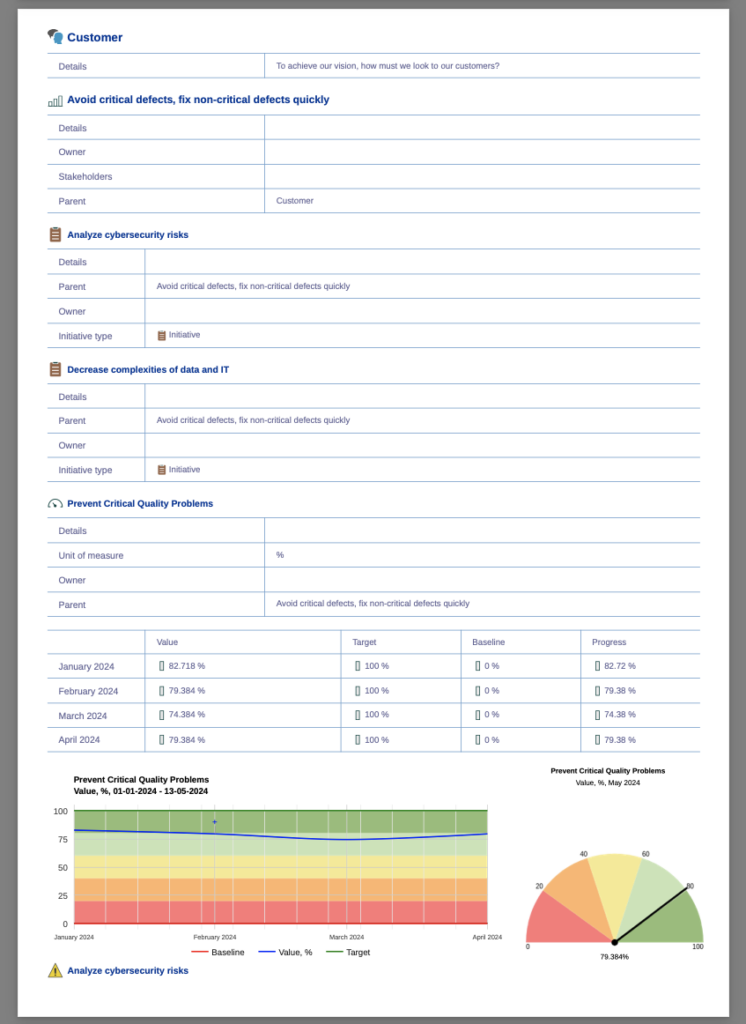
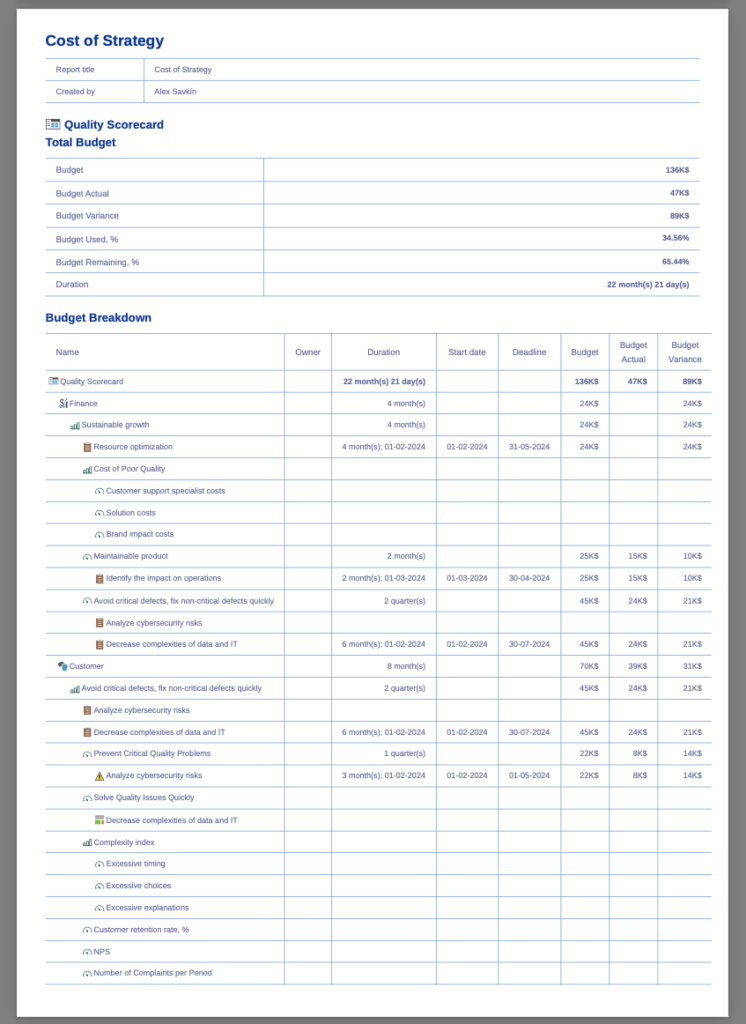
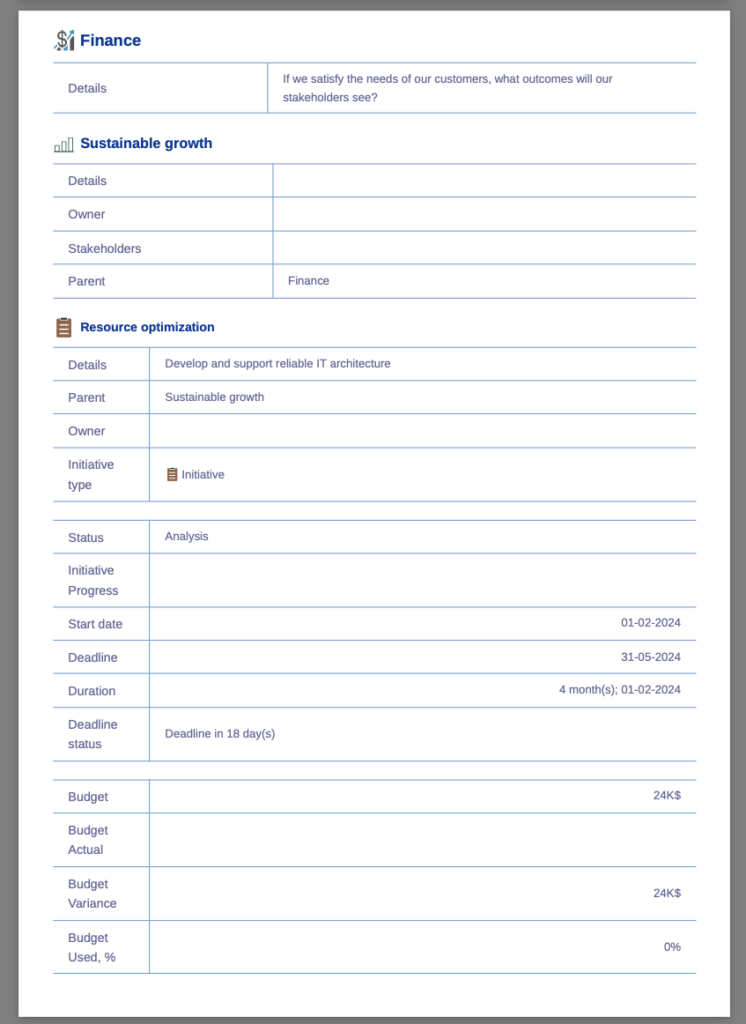
Start from predefined reporting profiles, customize them as needed, and schedule automatic delivery by email.
Keep Performance Data Secure, Governed, and Audit-Ready
Control access to performance data and support your organization’s security, governance, and audit requirements.
Decision-Ready Performance and Strategy Dashboards
Bring objectives, KPIs, initiatives, risks, and action plans into one management view for regular performance and strategy reviews.
 Track KPIs over time.
 Visualize risks and risk mitigation plans.
 Track the execution of action plans.
 Customer Service Strategy Scorecard.
 Keep Strategy Maps Alive Between Review Meetings
Automatically generate strategy maps from your scorecards so objectives, KPIs, initiatives, and performance remain up to date.
 Balanced Scorecard for IT.
  Balanced Scorecard-style strategy map created automatically.
 Objectives with live performance and initiatives data.
 Customizable canvases with live data from the scorecard.
Track How Risks Changes Over Time
Identify and measure  risks for strategic objectives and track their treatment initiatives.

Bowtie analysis of threats and consequences with dynamic controls.
 Define risks in the context of objectives.
 Quantify inherent, acceptable, and residual risk.
 Visualize risk evolution.
Build and Audit Strategy Scorecards Faster with AI
Use AI to cascade strategy into scorecards, suggest goals and KPIs, import data, and audit existing scorecards.
 Use AI to support and improve strategic analysis.
 Review the AI’s suggestions before adding them.
Trusted by Strategy and Performance Teams Worldwide

















Use Cases for Strategy and Performance Management
See how organizations use BSC Designer for strategy execution, KPI management, functional scorecards, governance, risk, and other performance management processes across industries and sectors.
Public Sector & Government
Evidence-Based Performance Reviews
— National Revenue Authority (Africa)
Cascading Strategy for Regulatory Oversight
— Data Protection Authority (Europe)
Finance & Investment
KPI Scoring Standards
— Financial Institution (Asia)
Portfolio Monitoring Framework
— VC Firm (USA)
Education & Research
Five-Year Strategy Rollout
— University (GCC)
Healthcare & Life Sciences
Aligning Clinical and Support Functions
— Healthcare Organization (USA)
Environmental & Industrial Operations
Implementing an existing Balanced Scorecard
— Environmental Consultancy (GCC)
Energy & Engineering
KPI Compliance Controls
— Electrical Engineering Company (LATAM)
Vertical & Horizontal Alignment
— Integrated Coal Mining Company (Asia)
Corporate & Services
Strategy and Risk Model
— 3PL Logistics Provider (Mexico)
KPI and Incentive Linkage
— Food Producer (LATAM)
SLA Scorecard Replication
— Telecom Provider (Europe)
Professional & Advisory Services
Policy Control Automation
— Consulting Firm (Africa)
ROI-Driven Strategy Execution
— Digital Transformation Consultancy (GCC)
Non-Profit & NGOs
RBM-Aligned Strategy System
— Non-Profit Organization (GCC)
Move Beyond Spreadsheet-Based Performance Management
Start with a free plan to manage goals, KPIs, initiatives, risks, and scorecards in one structured system. No credit card required.
 Present BSC Designer to key stakeholders involved in strategic planning.